Train an LLM on a Laptop (No GPU)
You do not need a GPU to learn how a language model is trained. This page trains a small Transformer from scratch on a normal laptop CPU: the full pipeline, from raw text to a tokenizer you trained yourself to a model that writes stories, in about ten minutes.

Here is what the smallest preset wrote after 8 minutes of training on a laptop CPU (636K parameters, the classic architecture):
Once upon a time, there was a big, in a warm ball. The little boy was very independent and a
big green dog named Max. Max was excited to see a lot of the fire. He wanted to get down.
Lily walked outside to the park to see what to help them. Tim saw a big dog with a red tail,
and Sam. They thought it was not playing with the fire. Tim was so happy.
And the same preset with the modern architecture (369K parameters, 5 minutes):
Once upon a time, there was a little girl named Lily. She lived in a big forest. She loved to
cook all his friends. One day, they loved to play in the park outside. Lily was very happy and
thanked her friend, a little girl named Mia. Mia would have a game with her friend, Sam. They
all played together, they were very happy.
The grammar is right, the characters have names, and sentences follow each other. The plot wanders, because a model this small cannot hold a story together; the bigger presets below get further. It is a great place to start.
Training a tiny LLM from scratch is not the same as training a ChatGPT-scale model. The goal here is to understand every step by running it yourself. The same code scales up: the GPU presets and the post-training stages use exactly these building blocks.
Step 1: Install
git clone https://github.com/FareedKhan-dev/train-llm-from-scratch.git
cd train-llm-from-scratch
uv sync                    # or: pip install -e .
On Windows and macOS the default PyTorch is already the CPU (or Apple MPS) build. On Linux,
pip install torch --index-url https://download.pytorch.org/whl/cpu first saves a 2.5 GB
CUDA download.
Step 2: Prepare the data
This downloads 25 MB of TinyStories (short stories written with a small vocabulary, made for tiny models) and its validation file, trains a 4096-token BPE tokenizer from scratch on 10 MB of it, and writes the token streams:
TinyStories V2 (roneneldan/TinyStories): 30,496 train / 5,000 val documents
Training a byte-level BPE tokenizer: vocab 4096 on 10.0 MB ...
  done in 3.7s
  wrote 6,095,088 tokens -> data/tiny/train.h5
  wrote 991,095 tokens -> data/tiny/val.h5
Done. 4.02 characters per token, vocab 4096.
The whole step takes about 25 seconds. Why train a tokenizer instead of using GPT-2's? A
model has one embedding row and one output row per token. With GPT-2's 50,257 tokens and
n_embed = 64, those two tables alone would hold 6.4M numbers, ten times the whole tiny
model, and most of that vocabulary never appears in children's stories. A 4096-token
vocabulary fitted to the data keeps the model small and fast. The tokenizer lives in
src/tokenizer/bpe.py; Tokenizers: BPE from scratch explains it.
Other data:
python scripts/prepare_tiny_data.py --dataset shakespeare --vocab_size 2048
python scripts/prepare_tiny_data.py --dataset text --input my_notes.txt
python scripts/prepare_tiny_data.py --tokenizer r50k_base     # GPT-2's tokenizer instead
Step 3: Train
python scripts/train_transformer.py --preset tiny
python scripts/train_transformer.py --preset tiny --arch modern     # the 2026 architecture
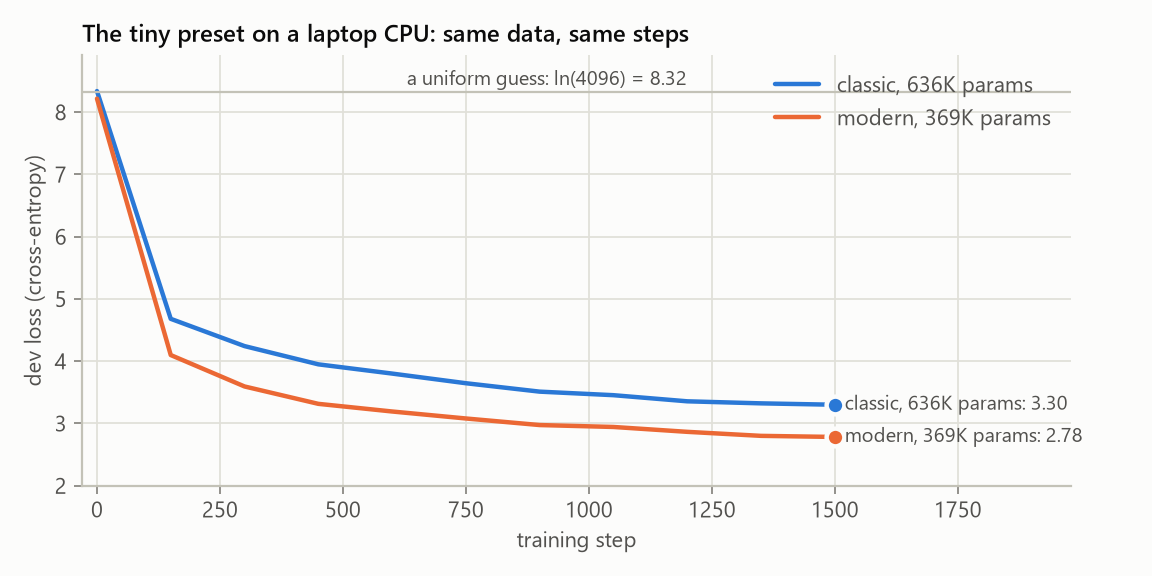
The vocabulary size and the tokenizer are read from the data file. You will see the loss start at about 8.3 and fall:
Total number of parameters in the model: 636,288 (classic architecture, vocab 4096)
Step: 0, Train loss: 8.3437, Dev loss: 8.3406
Step: 150, Train loss: 4.6711, Dev loss: 4.6813
Step: 600, Train loss: 3.7842, Dev loss: 3.8018
Step: 1350, Train loss: 3.2755, Dev loss: 3.3233
Finished training. Train loss: 3.2836, Dev loss: 3.3010
8.3 is not a random number: it is ln(4096), the loss of a model that spreads its guess
evenly over all 4096 tokens. Everything below that line is something the model learned.
Step 4: Generate
python scripts/generate_text.py --model_path models/tiny.pt --input_text "Once upon a time"
python scripts/generate_text.py --model_path models/tiny.pt --temperature 0.6 --top_k 20 --num_samples 3
Everything the model needs (its size, its architecture, its tokenizer) is stored in the checkpoint. Lower temperatures give safer, more repetitive text; higher ones more surprising.
The presets
| Preset | Layers | Heads | n_embed | Context | Steps | Parameters (classic / modern) | On our laptop CPU |
|---|---|---|---|---|---|---|---|
tiny |
2 | 4 | 64 | 128 | 1,500 | 0.64M / 0.37M | 5 to 8 minutes, dev loss 3.30 / 2.78 |
student |
4 | 6 | 192 | 256 | 4,000 | 3.4M / 2.6M | about 70 minutes; training loss 1.80 after 3,300 steps |
small |
6 | 6 | 384 | 256 | 8,000 | 13.9M / 12.2M | several hours; minutes on any GPU |
13m, 77m, 3b |
the README models | GPU, on the Pile data |
Parameter counts assume the 4096-token vocabulary. "Our laptop" is a 2025 Intel Core Ultra
7 255H using its CPU only. Our student run (modern architecture) shared the laptop with other
work: its first 400 steps took under 7 minutes, which puts the full 4,000 steps at about 70
minutes on a quiet machine, and it was stopped after 3,300 steps and two hours with a training
loss of 1.80. After 6.1M training tokens, everything the tiny preset ever sees, the student
model was already at 2.47 against the tiny model's 2.80: a bigger model learns more from the
same stories.
Your numbers will differ, so measure them:
python scripts/benchmark.py                          # tokens per second for each preset, both architectures
python scripts/model_report.py --preset student      # parameters, FLOPs, memory, Chinchilla-optimal data
Memory is not a problem at these sizes: the student preset needs well under 2 GB of RAM.
Experiments worth running
Every preset value can be overridden, so the laptop is a real lab:
- Classic vs modern. Train both architectures with the same preset and compare the dev
loss. On ours the modern model reached a lower loss with 42% fewer parameters. Read
the modern model to see what changed, then switch parts off one at a
time (
--set qk_norm=false,--set tie_embeddings=false,--set attention=mla) to find out which ones matter at this size. - Tokenizer size. Prepare the data with
--vocab_size 1024and8192, train the same preset on each, and compare samples. (Compare samples, not losses: losses over different vocabularies are not directly comparable. Bits per character would be.) - Learning rate.
--lr 3e-3and--lr 3e-4against the preset's2e-3. Too high diverges, too low barely moves. - Data size vs model size. The student preset sees about 33M tokens;
model_report.pysays 51M would be compute-optimal for its size. Try--steps 6000.
Hardware notes
- CPU threads. PyTorch uses one thread per physical core. On hybrid CPUs (performance +
efficiency cores) fewer threads can be faster; try
--threads 8and compare withscripts/benchmark.py --threads 8. - Apple Silicon is used automatically (
--device autopicks MPS when there is no NVIDIA GPU). - Google Colab or Kaggle give you a free GPU: the same commands run there, and the
smallpreset trains in minutes.
Where to go from here
- Read Step 2 of the README, which builds the classic model one class at a time.
- Read the modern model and train
--arch modern. - Move to a GPU (Colab is enough) and train the
13mpreset on the Pile, as in the README. - Post-training (SFT, reward model, DPO, PPO, GRPO) uses the GPT-2 tokenizer and a chat
format. To watch every stage run on a CPU without downloading anything, run the
end-to-end test, which trains each one for a few steps on generated data:
pytest tests/test_pipeline_e2e.py -s.